

Blogging Platforms Compared: Which Is Best For SEO?
March 10, 2024 | by Winson Yeung
In the digital age, blogging has become a cornerstone for online presence, and the choice of platform can significantly impact a blog’s visibility and ranking on search engines. This article delves into various blogging platforms, evaluating their SEO capabilities to guide you in selecting the most effective one for optimizing your content for search engine success. We explore technical considerations, cost-benefit analyses, built-in versus third-party features, and real-world performance to provide a comprehensive comparison that can inform your decision-making process.
Key Takeaways
- WordPress stands out as the preferred platform for SEO, offering robust plugins and built-in features that cater to search engine optimization needs.
- Technical SEO factors such as page speed, sitemaps, and mobile-friendliness are crucial, and not all platforms offer equal capabilities in these areas.
- The trade-off between free and paid platforms can significantly affect SEO outcomes, with paid options generally providing more advanced features.
- Choosing a blogging platform should involve a careful consideration of necessary built-in tools versus the flexibility of integrating third-party SEO plugins.
- Real-world case studies and expert opinions suggest that investing in a platform with proven SEO performance is key for long-term blogging success.
Evaluating SEO Capabilities in Popular Blogging Platforms
Understanding the Importance of SEO for Blogging
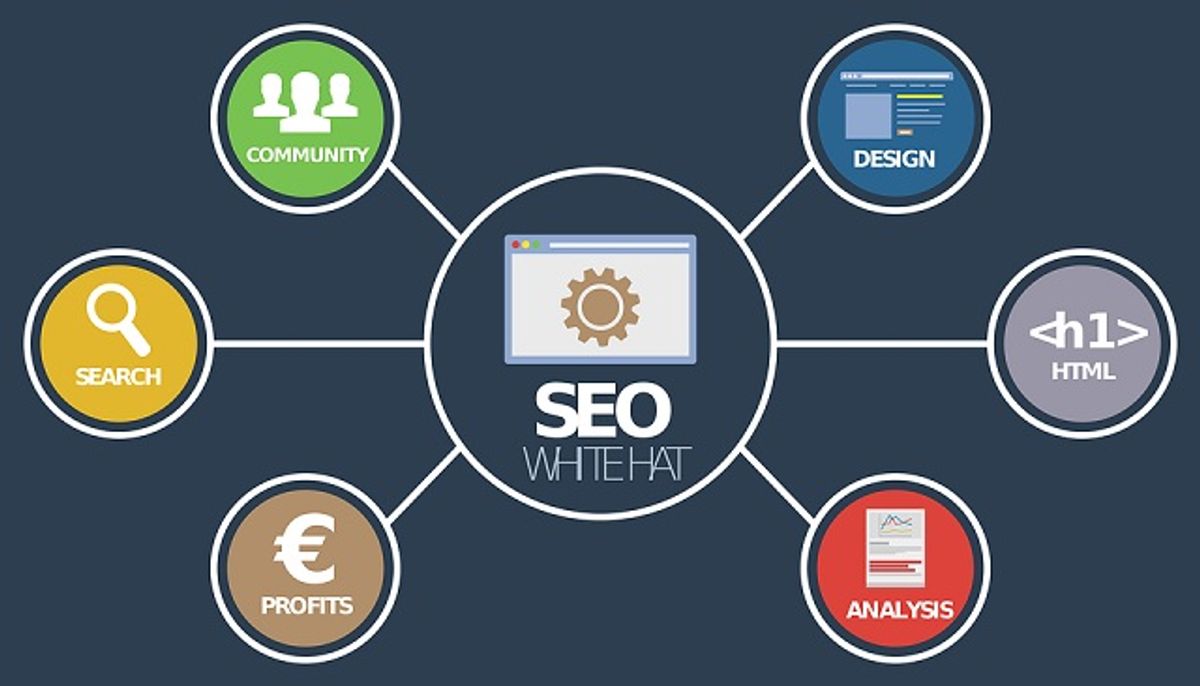
When I embarked on my blogging journey, I quickly realized that SEO is the cornerstone of digital visibility. It’s not just about crafting compelling content; it’s about ensuring that content reaches the right eyes. SEO, or Search Engine Optimization, is the art and science of making your blog more attractive to search engines like Google.
The value of content for SEO cannot be overstated. Rich and engaging content directly impacts SEO ratings, and search engines heavily weigh the quality of your site’s content.
Here are some key aspects of SEO that every blogger should consider:
- The strategic use of keywords to target specific queries.
- On-page optimization techniques to enhance user experience.
- Building a backlink strategy to establish authority.
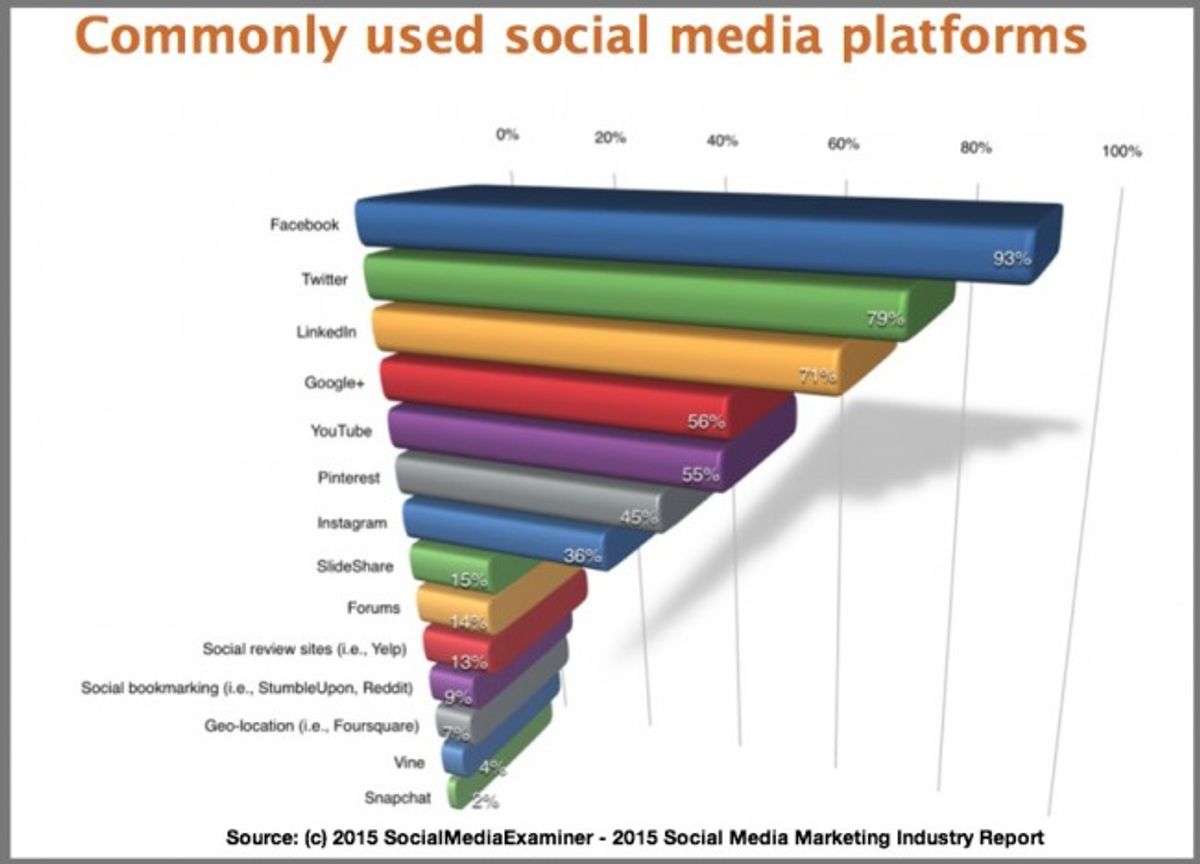
- Leveraging social media to boost engagement and traffic.
By focusing on these SEO basics, you can significantly increase the chances of your blog being discovered by your target audience. Remember, a blog that excels in SEO not only drives traffic but also has the potential to generate income through diversified monetization strategies.
WordPress: The Front-Runner for SEO
In my journey to optimize my blog for search engines, I’ve discovered that WordPress stands out as the premier choice for SEO. Its inherent SEO capabilities are a significant draw for business owners and content marketers alike. The platform’s flexibility with permalinks, mobile responsiveness, and swift loading times lay a solid foundation for SEO success.
However, it’s the extensive library of SEO plugins that truly elevates WordPress above its competitors. Plugins like Yoast SEO offer unparalleled customization, allowing for meticulous control over meta details, image optimization, and even server performance. Here’s a quick rundown of why WordPress is my go-to for SEO:
- Fully responsive design for mobile devices
- Adjustable permalinks for better URL structure
- Quick loading times to reduce bounce rates
- Access to powerful plugins like Yoast for comprehensive SEO management
Despite these advantages, it’s worth noting that overloading on plugins can lead to slower site speeds—a common challenge among WordPress users. Shopify, for instance, offers more basic but integrated SEO features without the need for numerous plugins, simplifying the process for those who prefer a more hands-off approach.
While both WordPress and Squarespace offer robust SEO tools, WordPress provides more control over the finer details, which can be crucial for SEO optimization. Squarespace, on the other hand, might appeal to those seeking simplicity with its built-in features.
Comparing SEO Features Across Various Platforms
When I delve into the SEO capabilities of various blogging platforms, I find that the devil is in the details. WordPress is often hailed as the superior choice for SEO, largely due to its extensive customization options and robust plugin ecosystem. However, platforms like Shopify and Squarespace bring their own strengths to the table, with built-in features that cater to SEO basics without the need for additional tools.
Here’s a quick comparison of key SEO features across different platforms:
- WordPress: Offers comprehensive SEO plugins like Yoast; struggles with site speed.
- Shopify: Provides basic SEO functions such as XML sitemaps; limited by forced URL structures.
- Squarespace: Scores well with built-in SEO tools; less customizable than WordPress.
While each platform has its merits, it’s clear that WordPress leads the pack for those who prioritize SEO in their content marketing strategy. With 84.7% of business owners and marketers preferring WordPress for SEO, it’s evident that the platform’s flexibility and resources for SEO troubleshooting are invaluable.
Choosing the right platform is a balancing act between ease of use and the depth of SEO features. It’s crucial to consider your long-term goals and the level of control you desire over your site’s SEO when making your decision.
Technical SEO Considerations for Blogging Platforms

The Impact of Page Speed on SEO
In my journey to optimize my blog for search engines, I’ve learned that page speed is a critical factor for SEO. A swift-loading site not only enhances user experience but also significantly affects rankings. Google has made it clear that faster sites have an edge in search results, as they provide a better experience for visitors.
- Evaluate themes and plugins for their impact on site speed.
- Use caching plugins like WP Super Cache or W3 Total Cache to improve load times.
- Consider a platform’s built-in features, such as Shopify’s CDN and server-side rendering, for better performance.
Patience and persistence in optimizing site speed can lead to a strong SEO foundation and long-term success.
It’s essential to optimize site speed, security, accessibility, and mobile experience to improve SEO. Focusing on these aspects not only boosts rankings but also builds user trust and engagement. Remember, a slow site can lead to a high bounce rate, with visitors leaving before they even fully engage with your content.
The Role of Sitemaps in Search Engine Optimization
When I delve into the intricacies of SEO for my blog, I recognize the pivotal role that sitemaps play. A sitemap is a blueprint of my website, guiding search engines through the content maze to ensure every page is found, crawled, and indexed. This is especially crucial when I make changes to my site’s structure or introduce new content; the sitemap acts as a beacon, leading search engines from the old paths to the new ones.
Sitemaps are not just about visibility; they also provide valuable metadata about my pages to search engines, such as the frequency of updates and the relevance of pages in relation to one another.
Platforms like Squarespace and Shopify understand this importance and offer automatic sitemap generation, simplifying my SEO efforts. Shopify even allows me to influence how search engines crawl my site by editing the robots.txt file. However, it’s worth noting that while Shopify handles the basics well, it does have limitations, such as less comprehensive support for structured data, which is vital for rich search results snippets.
Here’s a quick look at how some platforms approach sitemaps:
- Squarespace: Automatically generates sitemaps and allows hiding pages from search engines.
- Shopify: Produces XML sitemaps automatically and lets you customize the robots.txt file.
- WordPress: Preferred by 84.7% of business owners and marketers for its robust SEO capabilities, including advanced sitemap and indexing options.
Mobile-Friendliness as a Ranking Factor
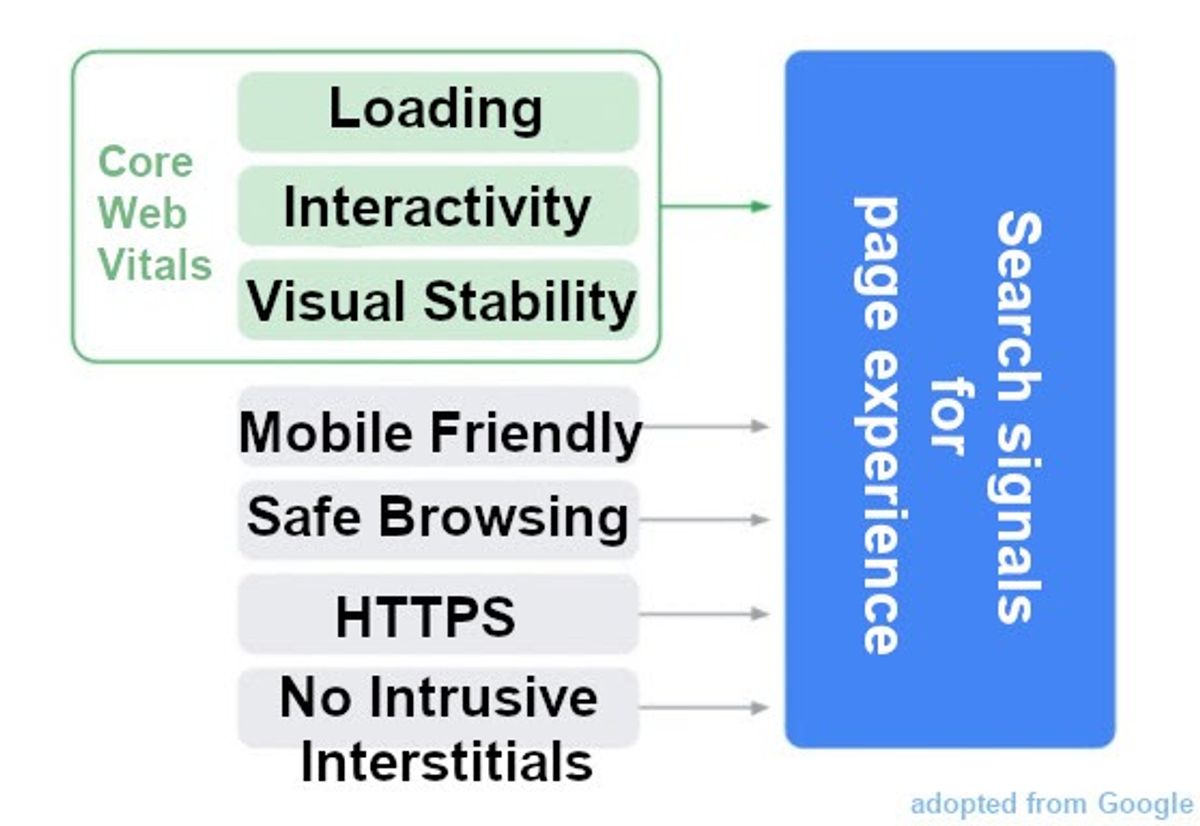
In the ever-evolving landscape of SEO, mobile-friendliness has become a pivotal ranking factor. With the majority of web traffic now coming from mobile devices, it’s clear that Google prioritizes sites that cater to this trend. Last year’s changes to Google’s ranking factors underscored the importance of mobile optimization, with page experience and mobile-friendliness being highlighted.
Ensuring that your blog is accessible and performs well on mobile devices is not just about providing convenience to your readers; it’s a critical component of your SEO strategy.
Platforms like WordPress offer themes that are mobile-responsive, meaning they automatically adjust to fit the screen of the device being used. However, it’s crucial to note that not all themes are created equal in this regard. On the other hand, platforms like Shopify use a mobile theme architecture to guarantee mobile optimization out of the box.
Here’s a quick look at how some popular platforms approach mobile optimization:
- WordPress: Offers mobile-responsive themes, but not all are optimized.
- Shopify: Uses a mobile theme architecture for guaranteed optimization.
- Wix/Weebly/SquareSpace: May have limitations in mobile SEO capabilities.
Choosing a platform that inherently supports mobile SEO is essential, as technical SEO elements like page speed and mobile-friendliness are not just add-ons but foundational aspects of a robust SEO strategy.
The Cost-Benefit Analysis of Blogging Platforms for SEO
Free vs. Paid Blogging Platforms: SEO Implications
When I first ventured into blogging, I quickly realized that the choice between free and paid platforms isn’t just about the upfront costs—it’s a decision that can significantly impact your blog’s SEO potential. Free platforms often come with SEO limitations, which can stifle your site’s visibility and ranking on search engine results pages. On the other hand, paid platforms typically offer advanced SEO features that can give you an edge in the competitive digital landscape.
Here’s a quick rundown of what you might expect from each type of platform:
-
Free Platforms:
- Basic SEO tools
- Limited customization
- Potentially slower page speeds
-
Paid Platforms:
- Advanced SEO features
- Greater customization options
- Faster page speeds and better technical SEO
While free platforms are cost-effective for hobbyists or those just starting out, serious bloggers aiming for high traffic and monetization should consider the long-term SEO benefits of investing in a paid platform.
Remember, the best blogging platform for SEO isn’t necessarily the one with the lowest price tag. It’s about finding the right balance between cost and functionality to ensure your blog thrives in search engine rankings.
Investing in the Right Platform for Long-Term SEO Success
When I consider the long-term success of my blog’s SEO, I’m reminded of the importance of choosing the right platform from the start. It’s not just about the features available today, but also about how the platform can grow and adapt to future SEO trends and algorithm updates.
Here’s what I’ve learned about investing in a blogging platform for SEO:
- Scalability: Can the platform handle increased traffic and content as your blog grows?
- Customizability: Does it allow for advanced SEO techniques and customizations?
- Support: Is there a community or customer service that can help with SEO questions?
- Updates: How frequently does the platform update for SEO improvements?
Choosing a platform with robust SEO capabilities is an investment in the future visibility of your blog.
I’ve seen platforms like Wix and Weebly attract beginners with their ease of use, but they often fall short on advanced SEO features. On the other hand, platforms like WordPress offer a high degree of versatility and control, which is crucial for SEO. It’s about finding the balance between user-friendliness and the ability to perform granular SEO optimizations.
David Zimmerman, an SEO coach, echoes this sentiment, advising to choose according to your goal: WordPress for blogs and lead-generation. With 46% of marketers attributing their brand’s success to SEO, the stakes are high. The platform you choose now can determine your blog’s future.
Budgeting for SEO: Hidden Costs in Blogging Platforms
When I first embarked on my blogging journey, I quickly learned that the initial costs of setting up a blog were just the tip of the iceberg. Hidden costs can accumulate, turning what seemed like an economical venture into a pricier endeavor. For instance, while some platforms offer free plans, they often lack essential SEO features, compelling you to upgrade to paid plans or invest in third-party tools.
It’s crucial to consider the long-term financial implications of your chosen platform and the SEO tools you’ll need.
Here’s a breakdown of potential hidden costs:
- Premium themes that are SEO-optimized
- Advanced SEO plugins or extensions
- Professional SEO audits and consultations
- Content delivery network (CDN) services for improved page speed
According to a recent guide, your blog costs could range from $34.50 to $65.40 to start a blog in 2024. This estimate, however, often excludes the ongoing expenses associated with maintaining and optimizing your blog for search engines. It’s vital to budget for these recurring costs to ensure the longevity and visibility of your blog.
Built-In vs. Third-Party SEO Features in Blogging Software
The Advantages of Built-In SEO Tools
When I delve into the world of blogging, I’m immediately drawn to platforms that simplify the SEO process. Built-in SEO tools are a game-changer, offering a seamless integration that can significantly boost my blog’s visibility. These native features often include customizable SEO-optimized code, search engine-friendly URLs, and on-page optimization capabilities.
Here’s a quick rundown of the pros I’ve found with built-in SEO tools:
- Easy to use and manage
- No need for additional installations or configurations
- Often updated by the platform to stay current with SEO trends
The real magic happens when these tools work in tandem with my content strategy, enhancing my blog’s online presence without the constant need for manual tweaks.
However, it’s important to remember that while AI-driven SEO tools enhance online presence and automate tasks, there’s no substitute for the human touch in content creation. Real-time adaptability is crucial for success, and that’s where I come in, steering the ship with a keen eye on analytics and user engagement.
Integrating Third-Party SEO Plugins and Extensions
When I first delved into the world of blogging, I quickly realized that optimizing for SEO and readability is crucial. While many platforms offer some level of SEO tools, the real game-changer comes from integrating third-party plugins and extensions. For instance, on WordPress, the Yoast SEO plugin is a powerhouse, offering a suite of features that go beyond the basics of title and meta description optimization. It’s about sharing yourself with the world, and to captivate readers, incorporating multimedia and valuable content is key.
The process of selecting the right SEO plugin can be daunting. I always start by searching the plugin library and checking for compatibility with my version of WordPress, as well as the number of positive reviews. Here’s a quick list of the plugins that have become staples in my SEO toolkit:
- Yoast SEO: The go-to for content and technical optimization.
- WP Rocket: For improving site speed and optimizing Core Web Vitals.
- RankMath: A comprehensive tool for on-page SEO.
While the built-in SEO features of platforms like Shopify are convenient, they often lack the depth that plugins like Yoast provide. With WordPress, the flexibility to choose and configure these tools allows for a tailored approach to SEO, which can be a significant advantage.
However, it’s important to note that using multiple plugins can sometimes lead to slower loading speeds, which is a top challenge according to SEO experts. Balancing the number of plugins with site performance is essential for maintaining SEO effectiveness.
Balancing Features and Usability for Optimal SEO
When I delve into the world of SEO for blogging, I’m constantly reminded that strategic SEO optimization drives organic traffic and enhances my online presence. It’s a balancing act between the sophistication of features and the simplicity of their use. Too often, platforms offer powerful SEO tools that are cumbersome to use, or user-friendly interfaces that lack depth in SEO capabilities.
Here’s what I consider when evaluating the balance:
- The ease of optimizing meta titles and descriptions.
- The flexibility in URL structuring for better readability by search engines.
- Support for image alt text to improve accessibility and SEO.
- The platform’s support for structured data to enable rich search results snippets.
The value of content for SEO cannot be overstated. Rich and engaging content directly impacts SEO ratings, and Google heavily weighs the quality of site content.
Ultimately, the goal is to choose a platform that doesn’t make me choose between power and usability. I need a tool that provides an intuitive interface while still allowing me to dive deep into SEO customization when necessary.
Real-World SEO Performance: Case Studies and Expert Opinions
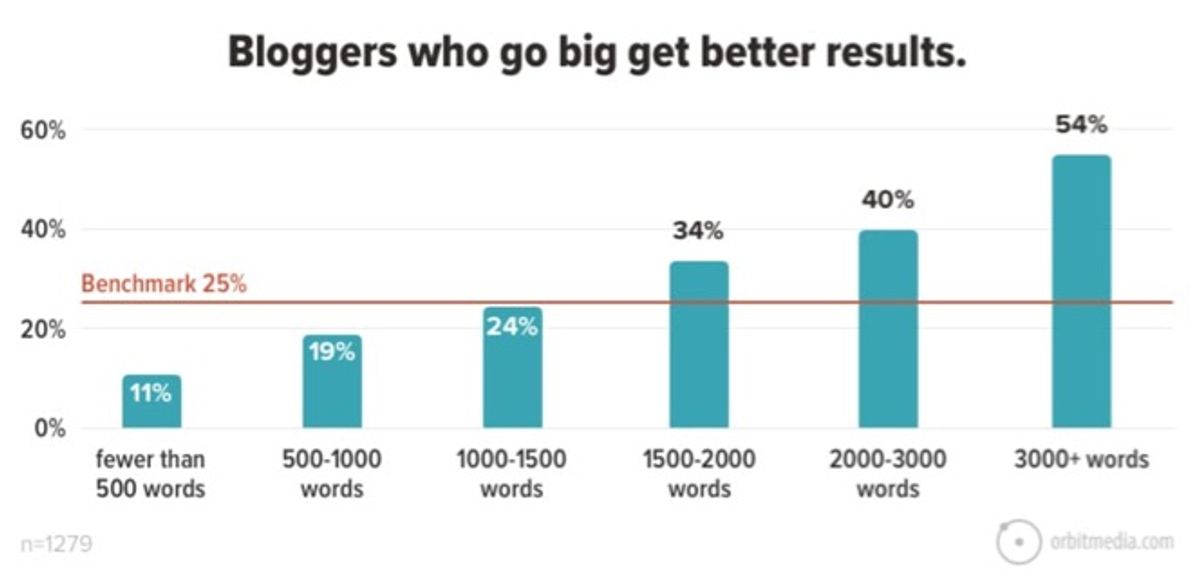
Success Stories: Blogs That Excel in SEO
Throughout my journey in the blogging world, I’ve witnessed numerous success stories that underscore the transformative power of effective SEO. Monitoring SEO performance is essential for understanding the impact of SEO efforts. Key metrics include organic search traffic, keyword rankings, CTR, bounce rates, and conversion rates. Tools and continuous monitoring are crucial for success.
The value of content for SEO cannot be overstated. Rich and engaging content directly impacts SEO ratings, with Google placing heavy emphasis on site content quality.
While technical SEO elements like page speed, sitemaps, and mobile-friendliness are foundational, the choice of platform can make or break a blog’s SEO success. For instance, WordPress, with its robust SEO plugins and built-in features, has been a common denominator in many success narratives. On the other hand, platforms like Wix and Weebly, despite their ease of use, often fall short in the SEO race.
Here’s a quick glance at the SEO features that have propelled blogs to the top:
- Built-in native SEO tools
- Reliable hosting and CDN
- Integration with marketing and analytics tools
These features, coupled with a strategic approach to content and technical SEO, have enabled blogs to dominate their niches and achieve remarkable search engine visibility.
Expert Recommendations: What SEO Professionals Prefer
In my experience, the consensus among SEO professionals is clear: WordPress is the preferred platform for SEO. This preference stems from its robust features and flexibility, especially when it comes to optimizing technical SEO with site speed, mobile optimization, secure connections, structured data, and more. Off-page strategies focus on link building, brand mentions, and reputation building for SEO success.
While site speed can be a concern, tools like WP Rocket and RankMath are frequently implemented to enhance WordPress sites, addressing core web vitals and on-page SEO respectively.
Here’s a quick rundown of the tools experts recommend for WordPress and Shopify:
- Yoast SEO: Highly recommended for content and technical optimization.
- WP Rocket: Improves site speed with caching.
- RankMath: A comprehensive tool for on-page SEO.
- Ahrefs: For link monitoring and competitor analysis.
- Semrush: Keyword research and competitor gap analysis.
- Surfer SEO: Content optimization and content briefs.
- Google Analytics: Website traffic tracking and reporting.
- Google Search Console: Site visibility optimization and indexing status checks.
When it comes to real-world preferences, a staggering 84.7% of business owners and marketers advocate for WordPress, citing its superior capabilities in ranking content higher on search engines. It’s evident that investing in the right platform, like WordPress, can significantly influence your blog’s SEO success.
Analyzing the SEO Effectiveness of Different Blogging Platforms
When I delve into the SEO effectiveness of various blogging platforms, I consider a multitude of factors. Technical SEO aspects like page speed, sitemaps, and mobile-friendliness play a crucial role in how well a blog performs in search results. It’s clear that platforms such as WordPress stand out due to their extensive SEO plugins and built-in features.
Balancing AI efficiency with human touch in content creation and SEO is key. Crafting engaging content for readers while optimizing for search engines leads to successful blogging.
However, not all platforms offer the same level of SEO support. For instance, Wix and Squarespace may be user-friendly for beginners, but they fall short in advanced SEO capabilities compared to CMS options like HubSpot CMS Hub or Drupal. Here’s a quick comparison of key SEO features across some popular platforms:
| Platform | Page Speed | Sitemaps | Mobile-Friendliness | SEO Plugins/Tools |
|---|---|---|---|---|
| WordPress | Excellent | Yes | Yes | Extensive |
| Wix | Good | Yes | Yes | Limited |
| Squarespace | Good | Yes | Yes | Limited |
| HubSpot CMS Hub | Excellent | Yes | Yes | Advanced |
| Drupal | Excellent | Yes | Yes | Advanced |
Regular technical SEO audits and backlink strategies are essential for visibility and ranking. It’s not just about the platform you choose; it’s also about how you use it to create and optimize content for both your audience and search engines.
Conclusion
In conclusion, the quest for the best blogging platform for SEO is nuanced and depends on various factors such as ease of use, customization options, and built-in SEO features. WordPress stands out as a robust choice due to its extensive SEO plugins and built-in capabilities, making it a favorite among experts and the most widely used platform. However, other platforms like Hubspot CMS Hub and Drupal offer strong SEO features for those looking for more technical control. Beginners may prefer user-friendly options like Hostinger Website Builder. Ultimately, the best platform for you will align with your specific needs, technical expertise, and content strategy. Remember, no matter the platform, the quality of your content and its value to your audience are paramount for SEO success.
Frequently Asked Questions
What is the best blogging platform for SEO?
WordPress is often considered the best blogging platform for SEO due to its comprehensive SEO plugins like Yoast and AIOSEO, as well as built-in features that help optimize websites for search engines.
Is CMS better for blogging than website builders?
CMS platforms like WordPress, Hubspot CMS Hub, or Drupal offer more advanced SEO capabilities compared to website builders like Wix, Weebly, and SquareSpace, which are more suitable for beginners but may have limitations in SEO.
What technical SEO factors should I consider when choosing a blogging platform?
Key technical SEO factors include page speed, sitemaps, and mobile-friendliness. These elements are crucial for search engine ranking and should be supported by the chosen blogging platform.
What are the cost implications of choosing a blogging platform for SEO?
The cost of blogging platforms can vary, with options ranging from free to paid. It’s important to consider the long-term SEO benefits and potential hidden costs when selecting a platform.
Should I opt for built-in SEO features or use third-party SEO plugins and extensions?
The choice between built-in SEO tools and third-party plugins depends on your specific needs and the blogging platform’s compatibility. Evaluate the features and usability to ensure optimal SEO performance.
What do SEO experts recommend as the best blogging platform?
SEO experts often recommend WordPress for its robust SEO capabilities, despite some concerns like site speed. It’s a popular choice among business owners with a content marketing strategy.
RELATED POSTS
View all


SEO Tips For Beginners To Rank Higher On Google
March 1, 2024 | by Winson Yeung

SEO Tips For Beginners To Rank Higher On Google
February 25, 2024 | by Winson Yeung

Blogging SEO: How To Optimize Your Posts For Search Engines
April 6, 2024 | by Winson Yeung